> For the complete documentation index, see [llms.txt](https://docs.firstledger.net/llms.txt). Markdown versions of documentation pages are available by appending `.md` to page URLs; this page is available as [Markdown](https://docs.firstledger.net/stay-to-earn/jumping-in-the-pools.md).
# Jumping in the Pools
Now that you have your coins, you can deposit them into the XRP/RLUSD pool.
Head over to First Ledger () and navigate to the Pools page located in the header.
{% file src="/files/crmoA8CpN8wNZjSLcTQM" %}
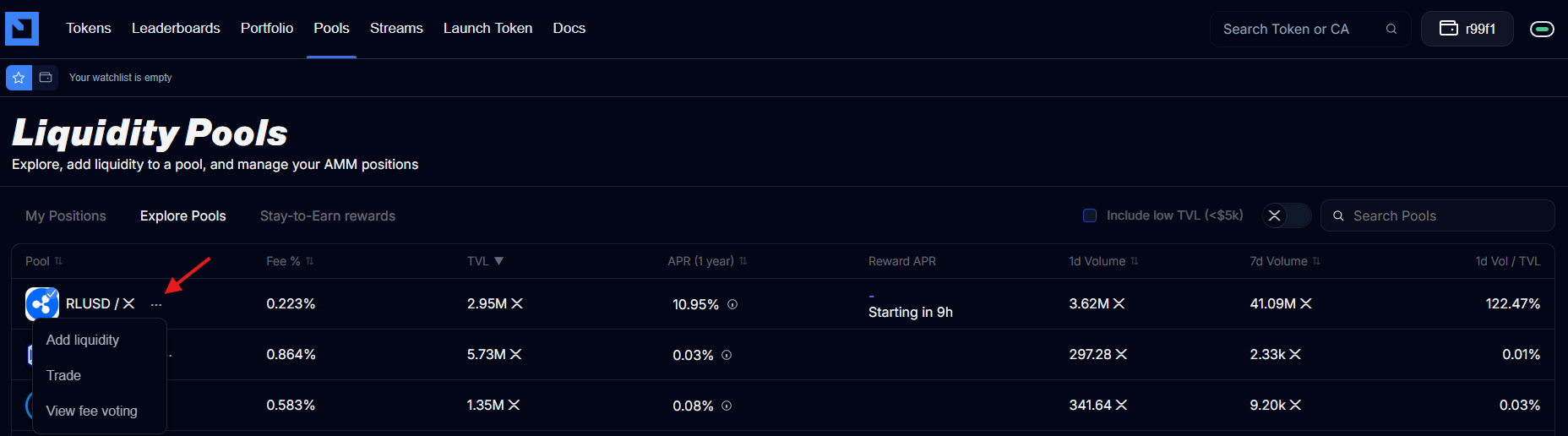
Locate the XRP/RLUSD pool. During the Stay to Earn program, the XRP/RLUSD pool will always be pinned to the top, making it easy to find.
Click the three dots next to the pool and select “**Add Liquidity.**”
Enter the amount you would like to deposit into the pool (single-sided or double-sided).
Once you have entered the amount, click “**Deposi**t” to finalize your transaction.\